Most small IT teams don’t need another 50-item cybersecurity checklist.
They need to know what to do first.
When people discuss cybersecurity best practices, identity security, vulnerability management, endpoint protection, backups, SIEM, zero trust, monitoring, incident response, governance, and third-party risk often appear together as if they were equally urgent.
They aren’t.
If I inherited an environment tomorrow and discovered that privileged accounts didn’t have MFA, I wouldn’t make building a sophisticated SIEM dashboard my first project.
If nobody could tell me which servers, endpoints, network devices, SaaS applications, or privileged accounts existed, I wouldn’t begin with an advanced zero-trust initiative.
And if the backup dashboard was green but nobody had successfully restored a critical system recently, I wouldn’t assume the organization had a recovery strategy.
Cybersecurity maturity has to be built in an order that makes operational sense.
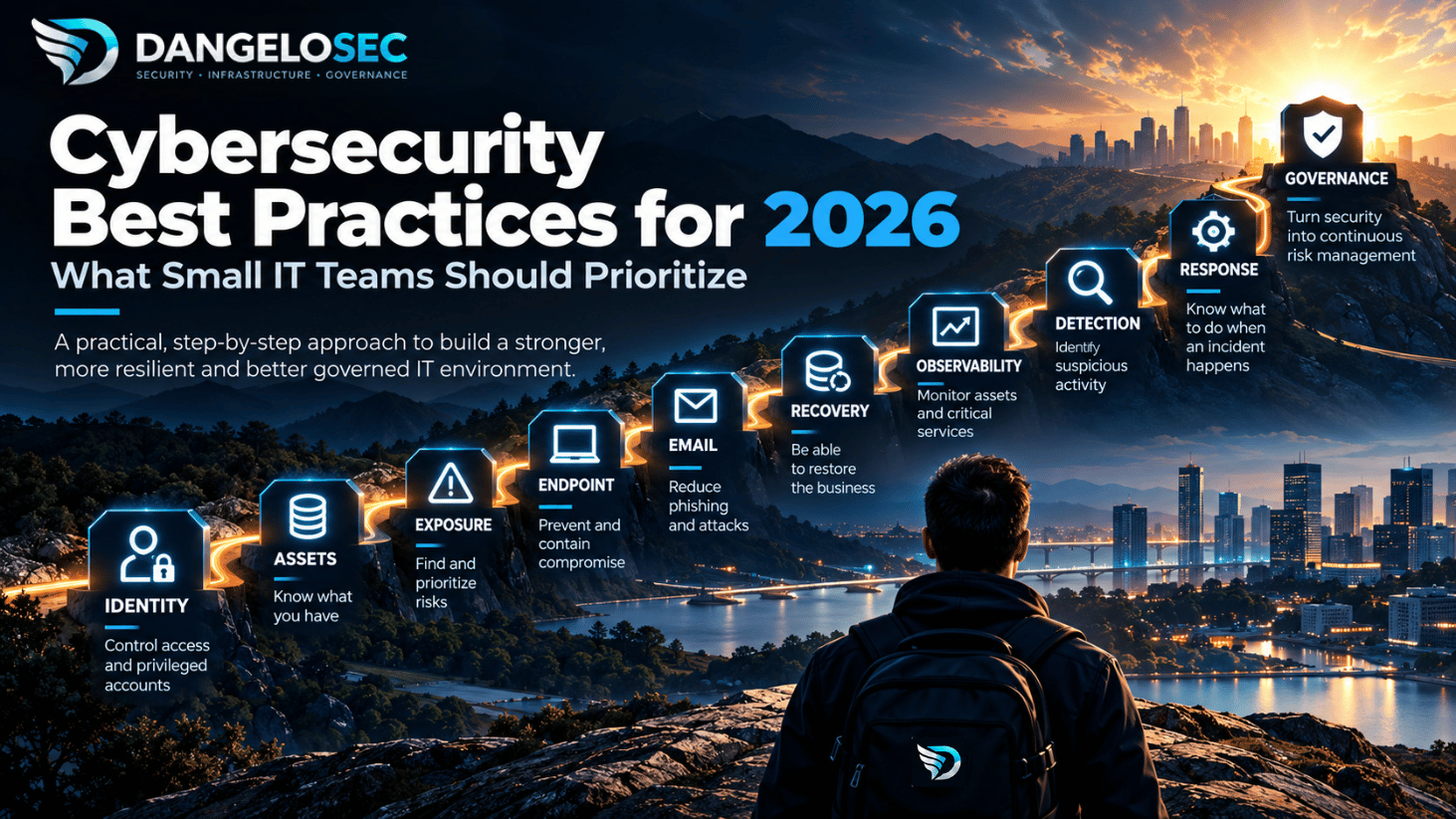
For a small IT team, I would think about that progression like this:
Control access → Know what you have → Understand exposure → Prevent compromise → Protect entry points → Recover → Observe → Detect → Respond → Govern.
That sequence isn’t a universal compliance framework. Every organization has different risks, dependencies, regulatory requirements, and levels of maturity.
It is a practical way to decide where limited people, time, and budget should go first.
NIST’s Cybersecurity Framework 2.0 provides a useful reference point. It organizes cybersecurity outcomes around six concurrent functions: Govern, Identify, Protect, Detect, Respond, and Recover. NIST also explicitly describes the framework as adaptable rather than a prescribed implementation process, including for small and medium-sized businesses.
The goal isn’t to buy ten security products.
It’s to build ten security capabilities.
Cybersecurity Best Practices 2026: Where I Would Start
If I were responsible for building or restructuring security in a small or mid-sized environment, this would be my initial priority model:
| Priority | Capability | Question it should answer |
|---|---|---|
| 1 | Identity, privileged access & MFA | Who can enter, and who has administrative power? |
| 2 | Asset inventory | What actually exists in our environment? |
| 3 | Exposure & vulnerability management | What can be attacked, and what should we fix first? |
| 4 | Endpoint protection | How do we prevent and contain endpoint compromise? |
| 5 | Email & phishing protection | How do we reduce a major path to user compromise? |
| 6 | Backup & recovery | Can we recover the business after prevention fails? |
| 7 | Infrastructure observability | Are critical assets and services operating normally? |
| 8 | Security logging & detection | Do we have evidence of suspicious or malicious activity? |
| 9 | Incident response | What happens when we confirm an incident? |
| 10 | Governance & third-party risk | How does security become continuous risk management? |
These aren’t ten independent projects.
They form a progression.
A company without a reliable asset inventory doesn’t really know its EDR coverage.
A company that doesn’t control privileged identities cannot confidently protect its infrastructure.
A company that cannot restore critical data isn’t resilient just because its security dashboard looks impressive.
And a company collecting millions of security events without someone responsible for investigating them hasn’t necessarily built detection capability.
Let’s start where I would start.
1. Secure Identities and Privileged Access First
Before worrying about sophisticated attack detection, I want to know: who can log in, and what can they control?
The modern security boundary extends far beyond the office network.
Users authenticate to Microsoft 365 or Google Workspace, cloud platforms, VPNs, SaaS applications, administrative portals, backup systems, remote-management tools, and network infrastructure.
An attacker doesn’t necessarily need to exploit a server if they can authenticate as someone who already has permission to control it.
So my first questions would be operational:
Who has administrative privileges? Does every privileged account still belong to someone who needs that access? Are administrators using privileged accounts for everyday work? Are administrator credentials shared? Which accounts don’t have MFA? Which service accounts have excessive privileges? What happens to access when an employee or contractor leaves? How are emergency accounts protected?
Those answers establish the starting point.
Prioritize MFA by potential impact
Ideally, MFA should be broadly deployed.
But if I inherited an environment with poor MFA coverage, I wouldn’t treat every account as equally urgent.
I would start with identities capable of causing the greatest damage: global or tenant administrators, domain administrators, cloud administrators, email administrators, VPN and remote-access users, backup administrators, security administrators, and privileged application accounts.
Where supported and operationally practical, phishing-resistant authentication should be preferred for sensitive and privileged access.
But MFA alone isn’t identity governance.
You still need to control who gets access, what privileges they receive, how credentials are protected, how access is reviewed, and how quickly it can be revoked.
Password management belongs in this conversation too.
Credentials stored in spreadsheets, browsers, email, chat messages, shared documents, or individual employees’ memory are difficult to govern consistently.
A business password manager can help centralize credential storage and sharing and make offboarding more manageable. If that is one of your gaps, our guide to business password managers for small IT teams goes deeper into that decision.
But don’t start with the product.
Start with the access model.
2. Build an Asset Inventory You Can Trust
Once identity is under better control, my next question is: what are we protecting?
This sounds basic. In real environments, it often isn’t.
Infrastructure accumulates over time: physical servers, virtual machines, laptops, switches, firewalls, wireless infrastructure, printers, storage, cloud VMs, SaaS applications, websites, containers, service accounts, certificates, domains, external IP addresses, legacy applications, and equipment nobody remembers deploying.
Somewhere in that environment is often a system that isn’t documented properly.
That’s a security problem.
You can’t reliably patch an asset you don’t know exists. You can’t verify EDR coverage against an unknown denominator. You can’t assess internet exposure if nobody remembers that an old application server is still publicly reachable. And you can’t design recovery priorities without knowing which systems actually support critical business processes.
NIST’s current SMB guidance similarly places hardware, software, systems, and services inventory within its Identify function.
Inventory needs business context
A useful asset inventory isn’t just a spreadsheet containing hostnames and IP addresses.
For important assets, I want to understand: what is it? Who owns it? What service does it support? Where is it located? Is it externally exposed? What operating system or platform does it run? Is that platform supported? How is it backed up? How is it monitored? How critical is it to the business?
That last question changes everything.
A test VM, a domain controller, an ecommerce database, and an employee laptop are all assets.
That doesn’t mean they deserve the same remediation or recovery priority.
This is also why infrastructure modernization and cybersecurity shouldn’t be planned as completely separate initiatives. If you’re rebuilding the underlying environment, our guide to modern IT infrastructure explores the broader architecture and dependencies behind that transformation.
Inventory tells you what exists.
Next you need to understand what can hurt you.
3. Manage Exposure, Not Just Vulnerability Counts
Once I know what exists, I can ask: what is vulnerable, exposed, or badly configured — and what should I fix first?
The final part is critical.
A vulnerability scanner can produce thousands of findings.
A small IT team cannot treat every finding as equally urgent. And it shouldn’t.
Imagine a critical vulnerability affecting an internet-facing VPN appliance.
Now compare it with a moderate vulnerability on an isolated workstation with limited privileges and no external exposure.
Both may appear in the vulnerability-management platform.
Operationally, they shouldn’t compete for attention in the same way.
Turn findings into a remediation queue
At minimum, I’d consider:
Severity: how serious is the technical weakness? Exposure: can an attacker reach the vulnerable service? Exploitability: is practical exploitation available or known to be occurring? Asset criticality: what happens if this particular asset is compromised? Privilege: what could an attacker reach next? Compensating controls: are other controls reducing the immediate risk?
That turns a scanner report into a risk-based remediation queue.
Without prioritization, vulnerability management can become an endless exercise in making dashboard numbers smaller.
That’s not the objective. The objective is reducing meaningful exposure.
Once exposures are identified, hardening becomes part of closing them. Our server hardening guide covers that operational side in more detail.
And if a remediation project involves replacing or redesigning a critical network-security control, the same principle applies: understand dependencies before changing production. That’s the central problem addressed in our firewall migration guide.
4. Build Endpoint Protection Around Containment
Now we know more about our identities, assets, and exposure.
The next question is what happens when malicious activity reaches an endpoint.
Traditional antivirus is only part of that answer.
For business endpoints, I want prevention, behavioral detection, visibility, and containment.
The specific product can vary. The operational questions matter more:
Are all supported endpoints enrolled? Are security policies actually being applied? Can the team isolate a compromised device quickly? Can we investigate what happened before and after detection? Is tamper protection enabled? What happens when a device hasn’t checked in for several days?
And one of the most important: who responds to the alert?
An EDR platform generating an excellent alert at 2:00 AM isn’t the same thing as having a 24/7 security operation.
Technology doesn’t create staffing.
A small IT team needs to understand what its endpoint platform prevents automatically, what it can contain automatically, what requires human analysis, and what happens outside business hours.
That’s the difference between owning an endpoint-security product and having an endpoint-security capability.
5. Protect Email Before Blaming Users for Phishing
Email remains one of the most important trust channels inside most organizations.
That makes it valuable to attackers.
The response cannot simply be: “train users not to click suspicious links.”
Awareness matters.
But relying on every employee to correctly identify every malicious message is not a security architecture.
Build layers instead.
Strong authentication reduces the value of stolen passwords. Email filtering attempts to stop malicious content before it reaches users. SPF, DKIM, and DMARC can support domain and email authentication controls. Endpoint protection provides another layer when malicious content reaches a device. Browser and DNS controls can reduce exposure to malicious destinations. User reporting provides a path to escalate suspicious messages.
The objective isn’t to make employees infallible.
It’s to make one human mistake less catastrophic.
And don’t forget risk concentration.
Finance, HR, executives, IT administrators, and employees capable of changing payment instructions or security settings are particularly valuable targets.
Security controls should reflect that reality.
6. Treat Backup as a Recovery Capability
Eventually, something will fail.
Maybe it’s ransomware. Maybe it’s hardware. Maybe it’s an administrator mistake. Maybe it’s a failed upgrade. Maybe someone deletes the wrong cloud resource.
That’s why backup belongs inside cybersecurity.
But a successful backup job doesn’t tell me whether the organization can recover.
A green backup dashboard isn’t a restore test.
If I’m evaluating recovery maturity, I want to know:
What is backed up? How frequently? Where are the copies stored? Can credentials that compromise production also delete the backups? Are critical copies appropriately isolated or protected from modification? Who can change retention? When was the last successful restore test? How long would a meaningful recovery take? What must be restored first?
Backup and disaster recovery aren’t the same thing
Having copies of files is useful.
Recovering a business service may require infrastructure, operating systems, configurations, identities, databases, application dependencies, DNS, certificates, networking, credentials, and documentation.
If the ERP database survives but nobody knows how to rebuild the environment around it, recovery is still a problem.
So don’t ask only: “do we have backups?”
Ask: “can we restore the services the business needs within an acceptable period?”
That is a much harder question. It’s also the one worth answering.
Architecture influences those responsibilities as well. In hybrid environments especially, it helps to understand exactly what remains your responsibility and what moves to a provider. Our on-premises vs. cloud guide explores those trade-offs.
7. Monitor the Infrastructure, Not Just Security Alerts
This is one capability I think gets lost in many cybersecurity best-practices lists.
Security monitoring and infrastructure monitoring overlap, but they don’t answer the same question.
A security program that knows which vulnerabilities exist but doesn’t know when a critical server, firewall, WAN link, database, VPN, or application becomes unavailable has a major visibility gap.
Infrastructure observability helps answer: is the environment operating normally?
Security monitoring increasingly asks: is there evidence that something malicious is happening?
A small IT team needs both.
What should you observe?
Start with availability. Can you reach the critical firewalls, switches, servers, hypervisors, internet links, VPNs, websites, databases, authentication services, and business applications?
Then performance. A service can technically be “up” while being effectively unusable. CPU, memory, storage capacity, latency, packet loss, interface utilization, application response time, and similar telemetry can expose problems before the help desk fills with tickets.
Then monitor the services themselves. A server answering ping doesn’t mean its database is healthy. A firewall being online doesn’t mean the VPN is working. A web server running doesn’t mean the application can complete a transaction. And a backup server being reachable doesn’t mean last night’s backup succeeded.
Learn what normal looks like
Monitoring becomes much more useful once you have baselines.
A server that normally runs at 20% CPU and suddenly remains above 90% deserves attention. A WAN connection that normally has stable latency but develops sustained packet loss deserves attention. Storage growing 2 GB per week and suddenly growing 50 GB overnight deserves attention. A critical service repeatedly restarting deserves attention.
None of those observations proves a cyberattack.
That’s precisely the distinction.
Observability tells you that something changed. Investigation tells you why.
Where tools such as Zabbix and Grafana fit
Zabbix and Grafana are good examples of technologies that can support this capability.
Zabbix can monitor infrastructure, services, devices, and telemetry. Grafana can visualize telemetry from multiple data sources and provide dashboards.
But installing both doesn’t automatically give an organization observability.
First define: which services are critical? Which dependencies can take them down? Which conditions require action? Who receives the alert? What should that person do?
Otherwise, monitoring becomes another platform producing alerts nobody trusts.
That’s noise, not operational visibility.
Monitor the service, not just the device
Suppose the business depends on an ecommerce application.
Don’t stop at “Web Server 01 CPU: OK.”
Ask: is the website reachable? Is DNS resolving correctly? Is the TLS certificate valid? Is the application responding? Is the database healthy? Is storage healthy? Are upstream network links performing normally? Are backup jobs succeeding?
Monitoring the complete service exposes dependencies that individual device dashboards often hide.
Certificates are a good example. Expiration and renewal are not merely PKI issues; they can become availability incidents. Our analysis of GoDaddy SSL certificate costs also explains why certificate lifecycle management and automation are becoming increasingly important.
8. Build Security Detection on Top of Visibility
Infrastructure monitoring tells me: something changed.
Security monitoring tries to determine: is something malicious happening?
This is where authentication events, endpoint telemetry, firewall events, cloud audit logs, IDS/IPS data, application logs, and eventually SIEM or other detection platforms become important.
But I wouldn’t start by buying the biggest SIEM available.
Start with questions you would need to answer during an incident
Imagine a Microsoft 365 administrator account is compromised.
Could you determine: where did the authentication originate? Was MFA used? What administrative changes occurred? Were new accounts created? Were permissions modified? Were mailbox rules created? Was sensitive data accessed?
Now imagine ransomware begins spreading.
Can you determine: which endpoint showed the first suspicious activity? Which identity was involved? Which other systems communicated with it? What happened before encryption started? Which systems should be isolated?
Those questions tell me more about the telemetry I need than the desire to fill a SOC dashboard with graphs.
SIEM isn’t step one
A SIEM can be extremely valuable.
But sending poor-quality logs from poorly understood assets into an expensive SIEM doesn’t automatically create detection capability.
First establish: assets, important log sources, retention, time synchronization, useful events, alert ownership, and response procedures.
Then centralization and correlation become much more valuable.
This is another reason cybersecurity maturity needs an order.
9. Decide How You’ll Respond Before the Incident
Eventually, prevention will fail.
The organization then needs to move from “something suspicious happened” to “we know what we’re going to do about it.”
Incident response doesn’t need to begin as a 200-page document.
For a small organization, I’d rather have a short plan people understand and practice than a beautiful policy nobody knows how to execute.
At minimum, establish: who can declare an incident? Who has authority to isolate an endpoint or server? Who can disable an executive or administrator account? Who contacts external providers, legal counsel, insurance, or leadership? Who preserves evidence? Who coordinates communication? Who decides when systems can return to production?
The first time those questions are discussed should not be while ransomware is spreading.
Restoration isn’t the end of an incident
Suppose an attacker gained access through compromised VPN credentials.
The affected server is restored. Great.
But if nobody rotates the credentials or fixes the access path, you may have restored the environment for the attacker too.
Remediation needs to ask: how did they get in? What did they access? How did they persist? Which credentials need to change? What needs patching or hardening? What evidence supports successful containment? What should change afterward?
This is the difference between restoring a system and addressing an incident.
Website compromise provides a smaller-scale example of the same distinction: detecting malware isn’t equivalent to removing it, understanding the entry point, and preventing reinfection. We explore that distinction in our guide to WordPress malware removal services.
10. Turn Cybersecurity Into Governance
Eventually, security needs to stop being a collection of IT projects.
It needs governance.
That doesn’t mean a small business needs bureaucracy modeled after a multinational bank.
It means someone must be able to answer: what are our important risks? Who owns them? Which risks are we reducing? Which risks are we accepting? What are our security priorities? Who has authority to make decisions? How do we know our controls still work? What happens when the environment changes?
Governance received greater prominence in NIST CSF 2.0 through the dedicated Govern function, which addresses areas including cybersecurity strategy, roles and responsibilities, policy, oversight, and supply-chain risk.
For organizations beginning to formalize this layer, our guide to IT governance for small and mid-sized businesses goes deeper into turning technical decisions into repeatable governance.
Your suppliers are part of the security environment
Modern businesses depend heavily on third parties: cloud providers, SaaS platforms, payroll, CRM, MSPs, cybersecurity providers, backup platforms, payment processors, hosting companies, consultants, and remote-support vendors.
The company may not operate those systems.
It still owns the business consequences when something goes wrong.
For important suppliers, understand: what information can they access? What privileges do they require? Do they support appropriate authentication controls? How is privileged access managed? How is data protected? What happens after a security incident? How do you retrieve your data when the relationship ends? Can you revoke their access quickly?
NIST’s SMB guidance specifically includes assessing cybersecurity risks from suppliers and other third parties as part of governance.
A vendor account with persistent administrative access is still privileged access.
The fact that its owner works for another company doesn’t reduce the potential impact.
Don’t Confuse Security Products With Security Capabilities
By this point, something should be clear.
An organization could buy an IAM platform, password manager, vulnerability scanner, EDR, email-security gateway, backup platform, monitoring system, SIEM, incident-response service, and governance platform… and still have a weak security program.
Because the real questions remain:
Is MFA actually enforced? Does the asset inventory reflect reality? Are vulnerabilities prioritized and remediated? Does endpoint protection cover the assets it should? Can backups actually be restored? Does someone respond to monitoring alerts? Are useful security logs available when an investigation begins? Does anyone know what to do during an incident? Does leadership understand the risks it is accepting?
Products enable capabilities. They don’t replace them.
If I Inherited the Environment Tomorrow: The First 30 Days
Suppose I walked into a company tomorrow with a small IT team and limited cybersecurity maturity.
I wouldn’t begin by designing the perfect three-year architecture.
I’d spend the first month reducing uncertainty and immediate exposure.
Days 1–5: Find critical identities and assets
First, identify privileged accounts, tenant administrators, domain administrators, VPN and remote-access accounts, backup administrators, critical servers, internet-facing systems, firewalls, cloud resources, critical SaaS applications, and backup infrastructure.
I’m trying to answer two questions: what could cause serious business impact if compromised? and who has the power to control it?
That’s my starting point.
Days 6–10: Close obvious identity gaps
Next: enforce MFA on privileged access. Disable stale accounts. Review excessive privileges. Separate everyday and administrative identities where appropriate. Eliminate unnecessary shared credentials. Protect emergency access. Improve credential management.
I’d rather close an obvious administrator-access gap now than spend the same week tuning sophisticated detection while privileged accounts remain unnecessarily exposed.
Days 11–15: Map exposure and endpoint coverage
Now map public IP addresses, VPN gateways, exposed applications, remote-management interfaces, unsupported systems, important vulnerabilities, endpoint-protection coverage, and patching gaps.
Then prioritize.
Externally exposed, exploitable, business-critical assets should receive attention before an internal dashboard full of low-impact findings.
Days 16–20: Prove recovery
Don’t ask only whether backup jobs are green.
Restore something. A file. A database. A VM. Better yet, a representative business service.
Document what failed, what credentials were required, how long recovery took, and which dependencies weren’t obvious before the test.
A failed restore during a controlled exercise is useful information.
A failed restore during ransomware is a crisis.
Days 21–25: Establish visibility
Make sure the team can see the health of critical infrastructure: servers, firewalls, WAN links, storage, VPN, DNS, applications, and backup jobs.
Build useful alerts instead of attempting to monitor everything immediately.
Then verify the security telemetry needed for likely incidents: authentication activity, privileged changes, endpoint alerts, firewall events, cloud audit logs, and other high-value sources.
Days 26–30: Run an incident scenario
Get the relevant people together and say: “it’s 9:00 AM. Our Microsoft 365 Global Administrator account has been compromised. What happens now?”
Who disables the account? Who revokes active sessions? Who checks authentication activity? Who looks for newly created accounts? Who reviews permissions? Who examines mailbox rules? Who tells leadership? Who contacts external support? Who determines whether data was accessed?
That conversation will expose weaknesses that another policy document may not.
Later, repeat the exercise with ransomware. Compromised VPN credentials. Lost laptop. Cloud data exposure. Website compromise.
Security maturity grows through operation.
What Should a Small IT Team Spend Money on First?
There isn’t a universal percentage of the IT budget that tells you what product should come next.
I would use a more practical rule:
Spend first where a control materially reduces a high-impact risk that the organization cannot currently manage well.
That could be identity. It could be replacing unsupported infrastructure. It could be endpoint detection and response. It could be backup. It could be infrastructure monitoring. It could be external incident-response expertise because nobody internally can perform that work.
The answer should follow the environment.
Not the vendor’s product category. And not the security trend of the month.
Cybersecurity Maturity Is Built on Dependencies
Look again at the sequence.
I can’t protect identities I don’t know exist. I can’t calculate endpoint coverage without knowing my assets. I can’t prioritize vulnerabilities without understanding exposure and criticality. I can’t reliably operate infrastructure I cannot observe. I can’t investigate an incident without telemetry. I can’t respond effectively without authority and procedures. I can’t recover without tested backups. And I can’t govern risk without visibility into all of those things.
That’s why cybersecurity modernization isn’t simply “buy better tools.”
It’s: build capabilities in an order where each layer makes the next one more effective.
Cybersecurity Best Practices for 2026: The Framework
If I had to take this entire guide into one planning meeting, these would be my ten priorities:
- Control privileged identities and enforce strong MFA.
- Build an asset inventory you trust.
- Prioritize vulnerabilities by exposure and business risk.
- Deploy endpoint protection with real containment capability.
- Build layers around email and phishing instead of relying on users alone.
- Protect backups and prove recovery works.
- Monitor the health and behavior of critical infrastructure and services.
- Collect enough security telemetry to detect and investigate suspicious activity.
- Decide who will respond before an incident happens.
- Turn all of this into ongoing governance, including third-party risk.
The technologies will change. Attack techniques will change. Products will change.
But the operational questions remain remarkably durable:
Who has access? What do we own? What is exposed? What can stop an attack? What can we see? Can we recover? Can we investigate? Can we respond? Who owns the risk?
If a small IT team can answer those questions confidently — and prove the answers operationally — it is doing something far more valuable than following another cybersecurity checklist.
It is building a security program.